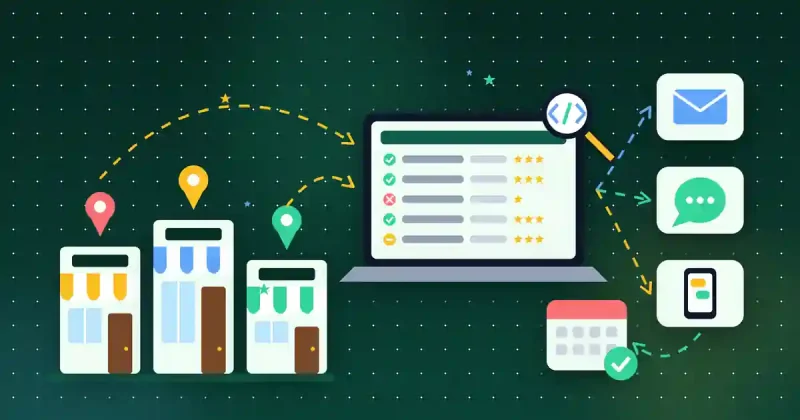

In the competitive landscape for small businesses, lead generation and nurturing often feel like a constant uphill battle. Manual data collection, inconsistent follow-ups, and fragmented systems consume valuable time and resources, hindering growth and diverting focus from core operations. For WordPress and WooCommerce businesses especially, scaling these efforts efficiently is paramount.
Imagine transforming this challenge into a streamlined, automated process that consistently delivers qualified leads and guides them towards conversion. This isn’t just a dream; it’s an achievable reality through a powerful workflow that integrates intelligent data extraction with robust business automation. This guide will show you how to combine the capabilities of DataXtract Pro and Auto Lead Pilot AI to build an efficient, scalable, and high-converting sales pipeline, ensuring your business thrives.
Understanding Your Automation Essentials
To kickstart your automated lead flow, let’s look at the core tools:
DataXtract Pro: Your Precision Data Harvester
DataXtract Pro is an all-in-one data extraction and outreach suite designed to find leads and gather essential business data from various online sources. It automates the tedious process of sifting through websites, directories, and platforms to collect specific information like contact details, company names, and addresses, providing clean, structured data ready for your marketing efforts.
Auto Lead Pilot AI: Your All-in-One Business Solution
Once you have your data, Auto Lead Pilot AI takes over. This comprehensive platform is an all-in-one lead generation and business automation solution, featuring campaign management, CRM, customer engagement tools, Google integrations, and team productivity features. It transforms raw leads into meaningful customer relationships through automated nurturing processes, tracking interactions, and providing insights for conversion.
The Automated Lead Flow: From Discovery to Deal
Here’s how to build a powerful, automated lead pipeline:
Step 1: Define Your Ideal Customer Profile (ICP)
Before any extraction, clearly define who you want to reach. What industry are they in? What are their pain points, job titles, or company size? The more specific your ICP, the more targeted and effective your lead generation will be. This ensures you gather genuinely qualified and relevant prospects.
Step 2: Extracting Leads with DataXtract Pro
With your ICP in mind, deploy DataXtract Pro to gather prospects.
- Identify Sources: Pinpoint where your ideal customers are online (e.g., industry directories, business listings, professional networks). For broader market research or social intelligence, consider supplementing with the All In One Smart Extractor to access diverse data sources.
- Configure Campaigns: Set up DataXtract Pro to specify websites to crawl, data types (email, phone, company name, etc.), and any refining keywords or filters.
- Run & Export: Initiate the extraction. Once complete, export your clean, structured data, typically as a CSV or Excel file, ready for import.
Always adhere to data privacy regulations (GDPR, CCPA) when extracting public business data.
Step 3: Cleanse and Prepare Your Data
Data hygiene is paramount. Before importing, cleanse your extracted list: remove duplicates, verify crucial information like email addresses, and standardize formats. This ensures your automated campaigns run smoothly and target valid contacts, preventing wasted efforts and improving deliverability.
Step 4: Importing Leads into Auto Lead Pilot AI
Now, bring your clean data into Auto Lead Pilot AI, your automation hub.
- Initiate Import: Navigate to the CRM/Contacts section and select “Import Contacts.”
- Map Data Fields: Match columns from your DataXtract Pro file (e.g., “Email,” “Company Name”) to corresponding fields in Auto Lead Pilot AI.
- Segment & Tag: Assign tags or place leads into specific segments during import (e.g., “Extracted_Q3_IndustryX”). This is crucial for triggering targeted campaigns.
Step 5: Architecting Automated Nurturing Campaigns in Auto Lead Pilot AI
With leads in Auto Lead Pilot AI, design multi-channel campaigns to nurture them towards conversion.
- Campaign Builder: Use the intuitive campaign or workflow builder.
- Define Triggers: Set triggers based on your imported leads (e.g., “When a contact with tag ‘Extracted_Q3_IndustryX’ is added…”).
- Craft Your Sequence: Design a series of touchpoints:
- Initial Outreach: Personalized welcome emails or introductory messages using extracted data.
- Value Content: Follow-up emails with blog posts, case studies, or helpful guides.
- Multi-channel Engagement: Integrate SMS messages, automated sales team tasks (e.g., “Make a call”), or webinar invitations.
- Clear CTAs: Guide leads towards a demo, free trial, or purchase.
- Set Delays & Conditions: Crucially, use delays (e.g., “wait 3 days”) and conditional logic (e.g., “if email opened, send X; if not, send Y”) to create dynamic, responsive paths.
- Leverage Google Integrations: Utilize Auto Lead Pilot AI’s integrations for tracking, scheduling, and contact management.
Step 6: Engaging & Nurturing for Conversion
This automated workflow ensures consistent, personalized engagement. Auto Lead Pilot AI delivers the right message at the right time, building trust and guiding leads through their buyer’s journey. Use merge tags for deep personalization, and integrate various communication channels for a comprehensive approach, always focusing on providing value over direct sales pitches initially.
Step 7: Track, Analyze, and Optimize for Continuous Improvement
Automation requires continuous monitoring. Auto Lead Pilot AI provides comprehensive analytics to refine your strategy.
- Monitor Metrics: Track open rates, click-through rates, conversion rates, and lead journey times.
- A/B Test: Experiment with subject lines, CTAs, and content to see what resonates.
- Refine ICP & Workflows: Use conversion data to fine-tune your DataXtract Pro campaigns and adjust Auto Lead Pilot AI sequences where leads drop off.
Transformative Benefits for Small Businesses
This automated workflow offers significant advantages:
- Time Savings: Automate manual tasks, freeing your team for strategic work.
- Higher Lead Quality: Targeted extraction means focusing on genuinely interested prospects.
- Consistent Engagement: Every lead receives timely, professional follow-ups.
- Scalability: Handle increasing lead volumes without proportional manual effort.
- Actionable Insights: Data from Auto Lead Pilot AI helps continually improve strategies.
Tips for Success
- Start Simple: Begin with one ICP and a basic sequence, then expand.
- Personalize Deeply: Use extracted data to make communications highly relevant.
- Iterate Constantly: Test, learn, and adapt your campaigns.
- Stay Compliant: Always respect data privacy regulations.
Conclusion
For WordPress and WooCommerce store owners, and small businesses alike, the path to converting prospects doesn’t have to be arduous. By strategically combining the data extraction power of DataXtract Pro with the sophisticated automation and CRM features of Auto Lead Pilot AI, you can create an intelligent, efficient, and highly effective lead generation and nurturing engine. Embrace this powerful workflow to reclaim time, drive strategic growth, and ensure every valuable lead contributes to your business’s success.